Starting Proproctor, again

I am reposting this because I've tried and failed again to run my test run with ProProctor.
I have disabled all security on my computer, I have run the system readiness check and everything checks out.
I've installed proproctor software
I follow the steps to launch the proproctor program through the website with my confirmation code and first four of my last name.
A proproctor splash screen comes up, says "Checking for updates" then "intiating start sequence" Then it disappears and nothing else happens.
I assumed that another screen would pop up while I wait for a proctor, or am I going crazy? This is beyond frustrating, as I've already scheduled my exam, this is the second time this has failed, and theres no indication of whats wrong. The only advice I've received is to "follow the instructions" which I clearly have.
Please help
-

Hi Trevor,
Based on your description, something within your security configuration or firewall might be blocking the third-party software from properly launching on your computer. My recommendation is to reschedule a test run appointment and if the issue occurs again, work with Prometric’s technical support using the chat tool on Prometric’s ehelp site to solve this issue.
-

I have had a problem with the ProProctor test run as well. Every checked out with my computer system, similarly to Trevor's comments, but when I attempted the test run I could not launch the exam after entering in my confirmation number and characters of last name. I tried Prometric's technical support by using the chat and received no live support truly addressing the problem - only received automated, generic replies, which lead to "no live agent is available now, try again later". I did receive an error code, so hopefully that will reveal what the nature of the problem is (Error Code: BB02010).
-
Ernest,
Thanks for your reply. I was finally able to get an error code from it this weekend on my desktop (BB2020 I believe) but it still would not launch normally.
I finally decided to dig out and switch to my laptop, and it worked like a charm. I'm not sure if it's a hardware issue or what, since I did build my desktop custom.
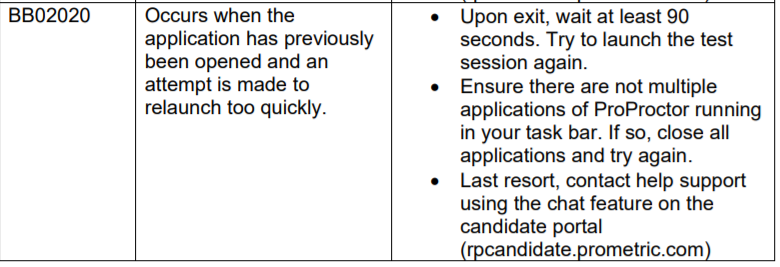
From my research, the error code BB2020 and I believe BB2010 just refers to retrying to launch the program too closely back to back, see attached image.
Please sign in to leave a comment.
Comments
3 comments