New Format Highlight / Strike Tool Issues

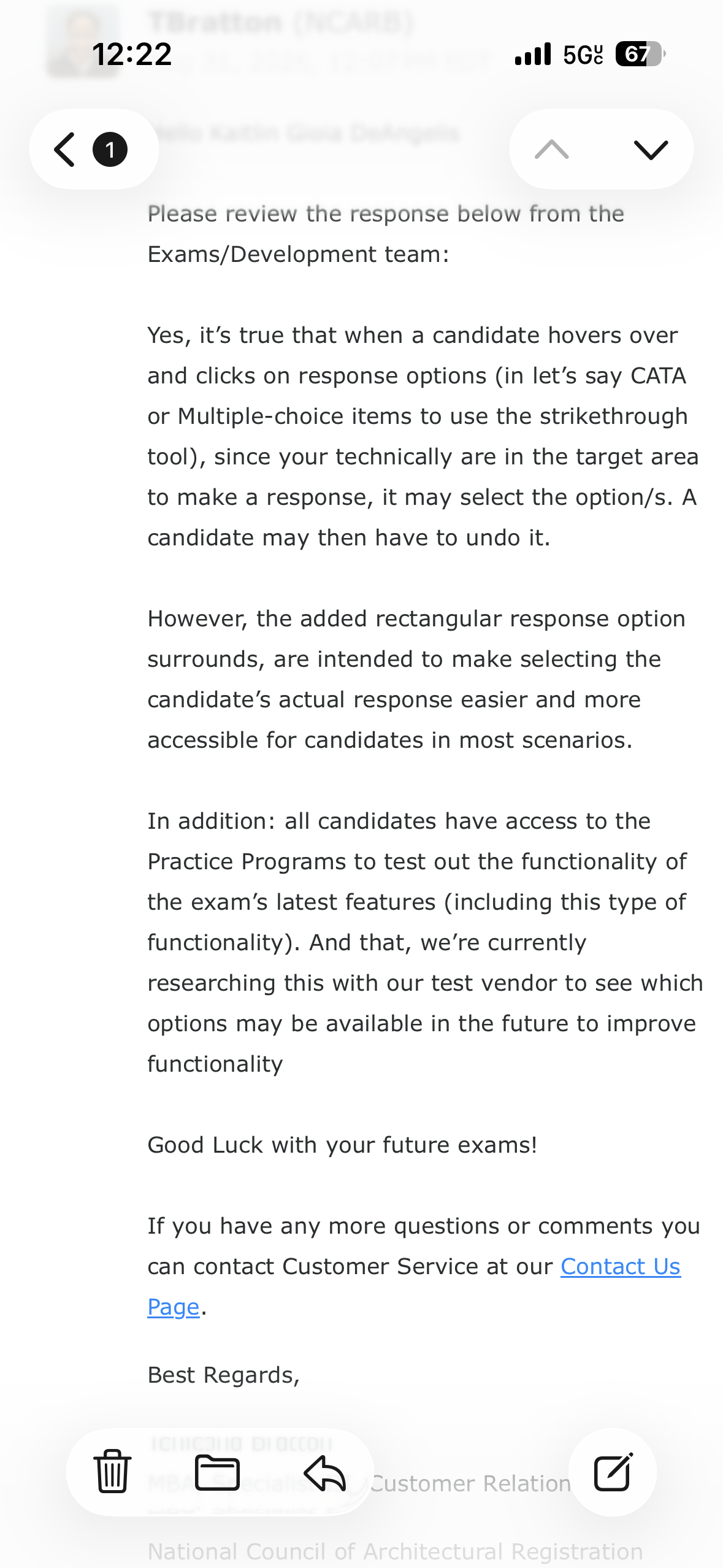
Has anyone also been having issues with the new exam format highlight/strike tools???? I noticed when I took the PPD exam a month ago that there seems to be something different about the NCARB exams where, when you select text to highlight or cross an answer item out, it also clicks the check mark for that item! This creates the issue where, if you are trying to evaluate the options, you may accidentally select items!!!! There does not seem to be a way around this in this new format. I do NOT remember this being the case on any of my previous exams, including PA, which I took last June 2025.
Anyone else with this issue???? Is NCARB working to fix this?!?!
-

Yes, I understand making the answers clickable as a box-style selection is nice to have and makes it easier to click on, but it also makes it clunkier/more awkward to use the highlight and strikethrough tools. You either have to slow down to mark up questions or click through an answer multiple times to mark it up or select it again as an answer.
-

If memory serves, in past exams you had to click exactly on the radio button to select your answer.
Not anymore, in this new version, like abruno168 said, they've increased the touch target. You'll select that answer if you click anywhere on the row.
I just went back to the demo exam (spent more time than I should have on this lol) and figured that if you first click outside of the click target and then highlight/strike out it won't select that option. I guess slowing down and carefully selecting is not a bad thing; especially if you're in a rush! Also, practicing the demo exams so we don't waste our time and brain power figuring out these little things while on the real exam.
Not ideal but for now (and while NCARB improves this) I'd say find the tiny gap to the left of the click target for the first click before selecting to highlight/strike out

-
kdegregorio166 as shown by ignaciomingo above, it takes some work around to get it to work. But it feels counterintuitive to the strikethrough and highlight tools provided, especially for those of us that mark up the exam while taking it to process information and retain the process while re-visiting questions/answers.
Do we have to adapt how we use the tools to get them to work as originally intended, or do we have to adapt to not using them and identifying new strategies (whiteboard notes?) to process questions and answers?
-
abruno168: Even if we've put up with worse (like no scrap paper, which is a whole other subject) I don't think we should have to adapt to faulty design
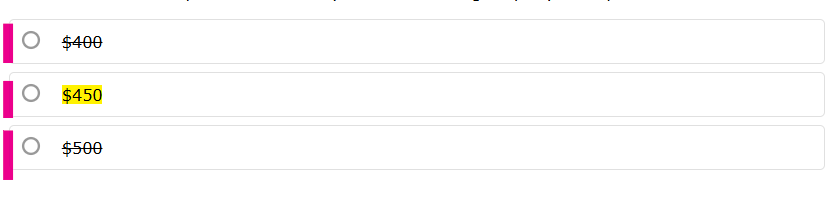
kdegregorio166: There's like 3 pixels (highlighted in pink) outside of the grey boxes. Do your first click there before dragging your mouse over the text you want to strike out or highlight, then release the click
Btw, I got a link to post-exam survey from NCARB. I'm mentioning this!!!
-
Oooooo well it doesn’t matter anymore for me because I just took my final exam PDD and passed!!!! 😱 but I really hope NCARB figures this out because I couldn’t get it to work! Hopefully this helps others while NCARB makes this change to the software quickly!! I will keep my eye out for a post exam survey because I couldn’t seem to find one last month.
-
I finally got a post exam survey, so I submitted this issue again. So far the only response from NCARB has been to send me a boiler plate response about the latest exam changes to online proctoring etc 😩…. very frustrating. Hopefully if enough of us keep reporting the issue someone will look into it soon!
-

kdegregorio,
This is the kind of thing I'd call NCARB's customer service and speak with someone about - the folks I know of at NCARB who are involved with the exam would be interested in the feedback, and that's the easiest way to get that info passed to the right people - especially if you can give them a gentle, direct suggestion like making the boxes around the answers a hair smaller (so there are more than 3 pixels to work with!).
They've generally been making adjustments to the exam UI and structure over the past several years to reduce barriers for folks with impaired vision, mobility, etc (and just sloppiness in where you're clicking due to speed or nerves too - it's better to have an answer selected than not throughout the exam). That's why drag-and-drop and the QFIB question types went away. Increasing the clickable area looks like one of those changes to me, but it looks like they've not accounted for the significant drop in utility to the highlight/strikethrough tools in how it's executed.
Best,
Ralph, the Amber Book Team


Please sign in to leave a comment.
Comments
15 comments